Talk to your Shopware shop. Read-only until you say otherwise.
One small server that speaks MCP to Claude, Cursor, VS Code or any other host, and the Admin API to your shop. Stuck orders, last month's numbers, low stock, a launch code, a shipped parcel: one sentence each, with Shopware doing the counting. It also notices when orders stop coming, and tries the checkout the way a customer would to find out why.
$ npx shopware-mcp setupThe whole idea, in one clip.
A real shop_audit answer, the numbers, the safety model and how to install. No sound.
The shop right now, the audit, the last seven days.
shopware-mcp brief --html brief.html writes a self-contained page: today against the same hours of recent weeks, how unusual the current quiet spell is, the audit's findings with samples and hints, and the week's revenue. It loads nothing from anywhere, reads fine in a mail client and follows the reader's dark mode. Open a real one, generated from the test shop.
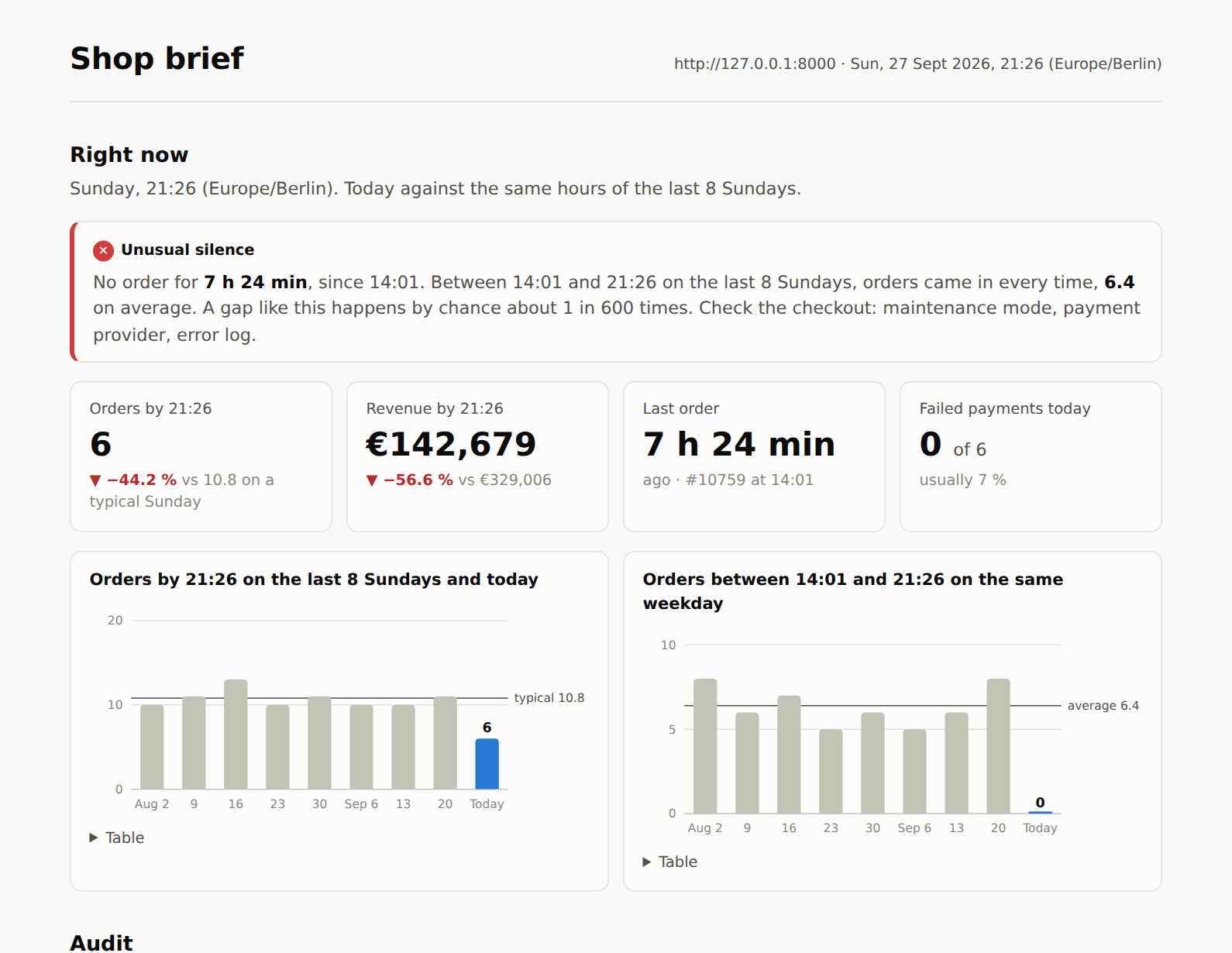
From cron, with a Slack line
0 7 * * * npx shopware-mcp brief --tz Europe/Berlin \
  --html /var/www/brief.html \
  --slack https://hooks.slack.com/services/…
In GitHub Actions
- uses: bnymnDev/shopware-mcp@v0.8.0
  with:
    url: https://shop.example.com
    client-id: ${{ secrets.SHOPWARE_CLIENT_ID }}
    client-secret: ${{ secrets.SHOPWARE_CLIENT_SECRET }}
fail-on: criticalReal output, replayed.
Every recording is the server's own output against a Shopware 6.7 test shop with generated demo data. Tool calls and results are verbatim, shortened to fit the screen. The prose is what an MCP host says with them.
Sunday evening, six hours without an order. The same hours of the last eight Sundays brought between three and seven each time; by chance this happens about once in 170. The agent tries to buy something the way a customer would, and finds the storefront in maintenance mode.
Curated tools, not a thin API wrapper.
Each tool returns compact JSON with exact totals, a description written for a model, and Shopware's own Criteria filters. No invented query language.
Twenty curated reads
Products, orders and their history, documents, customers, categories, promotions, reviews, payment and shipping methods, plugins, stock, sales channels, scheduled tasks, trading settings. { term, filter, sort, page, limit } in, { total, items } out.
The customer's view
checkout_simulate fills a throwaway cart through Shopware's own Store API, as a guest or as a given customer, and explains every cart error: country not shipped to, code expired, method hidden by a rule. storefront_search says why a product does not show up. Nothing is ordered.
A pulse and an audit
shop_pulse weighs today against the same hours of recent weeks and says how unusual a quiet spell is. shop_audit runs seventeen checks in one call, from paid-but-unshipped orders and missing invoices to a checkout that went silent.
Reports and a forecast
sales_report and customer_report let Shopware aggregate: revenue by channel and state, timelines, top products, new and returning customers, the change against the period before. stock_forecast turns sales velocity into days of cover and reorder quantities.
Fifteen guarded writes
Ship, mark paid, remind, refund, correct stock, note, generate a document or fifty at once, create a product or promotion, give a product a picture, moderate a review, update a customer, tag a record. Registered only with --allow-write, dry run by default, a write budget on top.
Any entity
entity_schema describes any of the 200+ entities, custom ones included, and entity_search queries them, with Shopware aggregations over the match on request. Secrets scrubbed, credential entities refused, long text truncated.
Plugin-aware
The server detects installed extensions and adds tools for the ones it knows, without touching the plugins: FroshTools for platform health, queue and advisories, Merqo for compliance. Your own pack is one file under src/extensions/.
Setup, doctor, brief
setup creates an integration with exactly the privileges the tools need. doctor says per tool what this integration can use. brief, audit and report print Markdown, JSON or a self-contained HTML page, with exit codes for cron and CI and a Slack line from brief and audit.
Packaged four ways
npm with build provenance, a Docker image on GHCR for amd64 and arm64, a one-click .mcpb bundle for Claude Desktop, and a listing in the official MCP registry.
You say. The agent calls.
| You say | The agent calls |
|---|---|
| "Is today normal?" | shop_pulse |
| "Why can't customer 10009 check out?" | checkout_simulate { customerNumber: "10009", items } |
| "Why does the code SUMMER26 not work?" | checkout_simulate { promotionCodes: ["SUMMER26"], items } |
| "Why can nobody find the steel shirt?" | storefront_search { term: "steel shirt", explain: "SW10002" } |
| "Is everything okay with the shop?" | shop_audit |
| "How did we do in August?" | sales_report { from, to, interval: "week" } |
| "Who were our best customers this quarter?" | customer_report { from, to, topCustomers: 20 } |
| "What happened to order 10042, and who did it?" | order_history |
| "Order 10042 shipped with DHL, tracking 00340434." | order_delivery_transition { transition: "ship", trackingCodes } |
| "Send me the invoice for 10042." | order_documents_list, then document_download hands over the PDF |
| "Which paid orders have no invoice yet? Create them." | shop_audit, then order_documents_bulk_create { type: "invoice" }, dry run first |
| "Are the cron jobs running at all?" | scheduled_tasks_list { onlyProblems: true } |
| "Mark this customer as VIP." | tag_assign { entity: "customer", add: ["VIP"] } |
| "Which reviews are waiting for approval?" | reviews_search, or the review_moderation prompt |
| "Is guest checkout on, and what is the default tax?" | shop_settings |
| "Thumbnails are missing, is the platform okay?" | frosh_health and frosh_queue, with FroshTools installed |
| "What do I need to reorder in the next two weeks?" | stock_forecast, or the reorder_list prompt |
| "Orders per payment method last month, with revenue?" | entity_search with a terms aggregation and a nested sum |
| "Create a 10 % code AUTUMN10 for October." | promotion_create, inactive until you say otherwise |
| "Which manufacturers have no logo?" | entity_schema, then entity_search on product_manufacturer |
| "Set it up with the least rights it needs." | not a tool: npx shopware-mcp setup |
| "Which of my tools will fail with this integration?" | not a tool either: npx shopware-mcp doctor |
| "Send me one page every morning." | shopware-mcp brief --html brief.html --slack … in cron |
A brake on every write.
- Read-only by default. Without
--allow-writethe write tools are not registered. An agent cannot discover what it cannot call. - Every write is a dry run first. The tools return the exact request they would send. Only an explicit
dryRun: falsetouches the shop, and the result is re-read from Shopware. - A write budget.
SHOPWARE_MCP_MAX_WRITES=20refuses the twenty-first real write of a process. No prompt can lift it. - A simulated cart is not an order.
checkout_simulategoes through Shopware's own admin proxy to the Store API, never calls the order route and deletes the cart afterwards. - Least privilege in one command.
setupgrants each tool exactly what it was measured to need. Reading the whole system config and installing plugins stay out unless you ask, and setup only ever changes a role it created. - Narrow writes, nothing deletes. The transition tools only move state machines; nothing moves money. Promotions are created inactive. There is no delete tool.
- No secrets anywhere. Credentials never appear in output, logs or errors.
entity_searchscrubs passwords, keys and tokens and refuses entities that hold credentials. - No telemetry. The server talks to your shop and to your host. Nothing else.
Three steps, one of them optional.
npx shopware-mcp setup logs in as an admin once, creates a read-only role with exactly the privileges the tools need and an integration using it, and verifies both. The password is never stored.--for <host> --write. Already have an integration? npx shopware-mcp init takes its key and secret.npx shopware-mcp doctor first to see which tools this integration can use and what is missing.Download shopware-mcp.mcpb from the latest release and double-click it, or add this to claude_desktop_config.json (npx shopware-mcp init --for claude-desktop --write does it for you):
{
  "mcpServers": {
    "shopware": {
      "command": "npx",
      "args": ["-y", "shopware-mcp"],
      "env": {
        "SHOPWARE_URL": "https://shop.example.com",
        "SHOPWARE_CLIENT_ID": "SWIA...",
        "SHOPWARE_CLIENT_SECRET": "..."
      }
    }
  }
}
One command; add --allow-write after shopware-mcp when you want the write tools.
claude mcp add shopware \
  -e SHOPWARE_URL=https://shop.example.com \
  -e SHOPWARE_CLIENT_ID=SWIA... \
  -e SHOPWARE_CLIENT_SECRET=... \
  -- npx -y shopware-mcp
They all take the same three fields. Cursor reads .cursor/mcp.json, VS Code .vscode/mcp.json (under servers), Windsurf and Gemini CLI their own mcpServers files, Codex CLI a table in config.toml, Zed its context_servers block. init --for <host> --write writes each of them.
{
  "mcpServers": {
    "shopware": {
      "command": "npx",
      "args": ["-y", "shopware-mcp"],
      "env": {
        "SHOPWARE_URL": "https://shop.example.com",
        "SHOPWARE_CLIENT_ID": "SWIA...",
        "SHOPWARE_CLIENT_SECRET": "..."
      }
    }
  }
}
The image serves Streamable HTTP on /mcp. Add SHOPWARE_MCP_HTTP_TOKEN and the endpoint requires a bearer token; without one, keep it on localhost.
docker run --rm -p 127.0.0.1:3333:3333 \
  -e SHOPWARE_URL=https://shop.example.com \
  -e SHOPWARE_CLIENT_ID=SWIA... \
  -e SHOPWARE_CLIENT_SECRET=... \
  ghcr.io/bnymndev/shopware-mcp
Three environment variables, then the server on stdio or HTTP.
export SHOPWARE_URL=https://shop.example.com
export SHOPWARE_CLIENT_ID=SWIA...
export SHOPWARE_CLIENT_SECRET=...

npx shopware-mcp                       # stdio (default)
npx shopware-mcp --http --port 3333    # Streamable HTTP on http://127.0.0.1:3333/mcp
npx shopware-mcp --allow-write         # also register the guarded write tools
npx shopware-mcp doctor                # which tools can this integration use